
Could WebMCP Be Used for SEO & Website Optimization?
By Bill Shultz | billshultz.com
Keyword search is still a vital part of SEO. META Tags. Schema markup too. No question there.
But what about SEO signals designed specifically for AI agents?
That is where WebMCP enters the picture.
WebMCP Tools Look a Lot Like SEO Tags — For Agents
From an SEO perspective, the parallel is hard to miss. And it is more of how and what SEO pro’s optimize:
SEO 1.0:
Around 2003. META Title/Description/Keywords — but also robots.txt files, XML sitemaps, content length, H1/H2, etc.. Basic site optimization deliverables, not just HTML but also Wordpress/Drupal/Joomla. Early Algorithms like Florida, Caffeine, plus also Google Webmaster Tools and the Urchin acquisition to create Google Analytics. Shouldn’t discount Google going public in 2004 and of course Google AdWords: It was - and still is - the money behind the movement.
SEO 2.0:
Around 2011. Panda & Penguin. SCHEMA Markup & Rich Snippets. The Yoast! Plugin for Wordpress, this really helped to expand SEO in general for WP as people could do more with it & see the results. Content explosions, blogs, deliverables, more awareness in general about the importance of - and depending on - search engines for just about anything. Mobilegeddon, Hummingbird, RankBrain, BERT, MUM (RankBrain/BERT/MUM are noted to be the precursors to AI), more.
SEO 3.0:
2023. Continuing to ride along RB/BERT/MUM — and expand AI with SGE (Search Generative Experience). AI Overviews launched in 2024, impacts from ChatGPT/LLMs and the evolution of AI Search and more.
The thing about SEO 3.0 so far is that there has really only been one true new SEO deliverable: llms.txt/llms-full.txt. Most SEO’ers are still looking to create more content, refine content, resources, clean, etc.. which are already part of SEO 1.0 and SEO 2.0.
But this WebMCP Tool changes everything. It is a straight up SEO Deliverable that people can utilize, use, expand, see in Chrome Inspect, use for upcoming Conversational Conversion Funnels - purchases, ecommerce = Communicating with the AI Agents. And there will be more, it’s rapidly evolving - but still - this WebMCP Tool is an actual Deliverable to manage.
SEO IS NOT DEAD. IT IS EVOLVING.
WebMCP tools are built entirely around verbs and actions. But they also carry words and descriptions — about products, services, companies, locations, and more. Sound familiar? That is exactly what META tags and Schema markup have always done. More than one of my friends named ‘Matt’ famously put it: “Words on a page.”
WebMCP tools are, in effect, a combined META tag and Schema markup layer designed for the agentic web. Same fundamental purpose. New delivery mechanism. New audience.
Initial findings show that using a combination of META Tags/sitemaps/robots, proper H1/H2s, accurate and descriptive SCHEMA Markup, and WebMCP Tools to pages (plus llms.txt) is the path forward to optimizing for the modern web. All of these are valid today.
Technical SEO is always in the mix, and Content is Still King (of course); but AI Agents in this new world of Agentic Powered Search don’t actually ‘read’ the content the way us humans do.
AI is not going away.
->-> See how we’re deploying WebMCP Tools with GTM to Address AI Hallucinations on the fly.
Agents Are Already Working With This — Right Now
NOTE: THIS IS ALL EXPERIMENTAL.. But it is working, tested & verified on live websites
Here is the part I enjoy most: it is not theoretical. It is live and testable today.
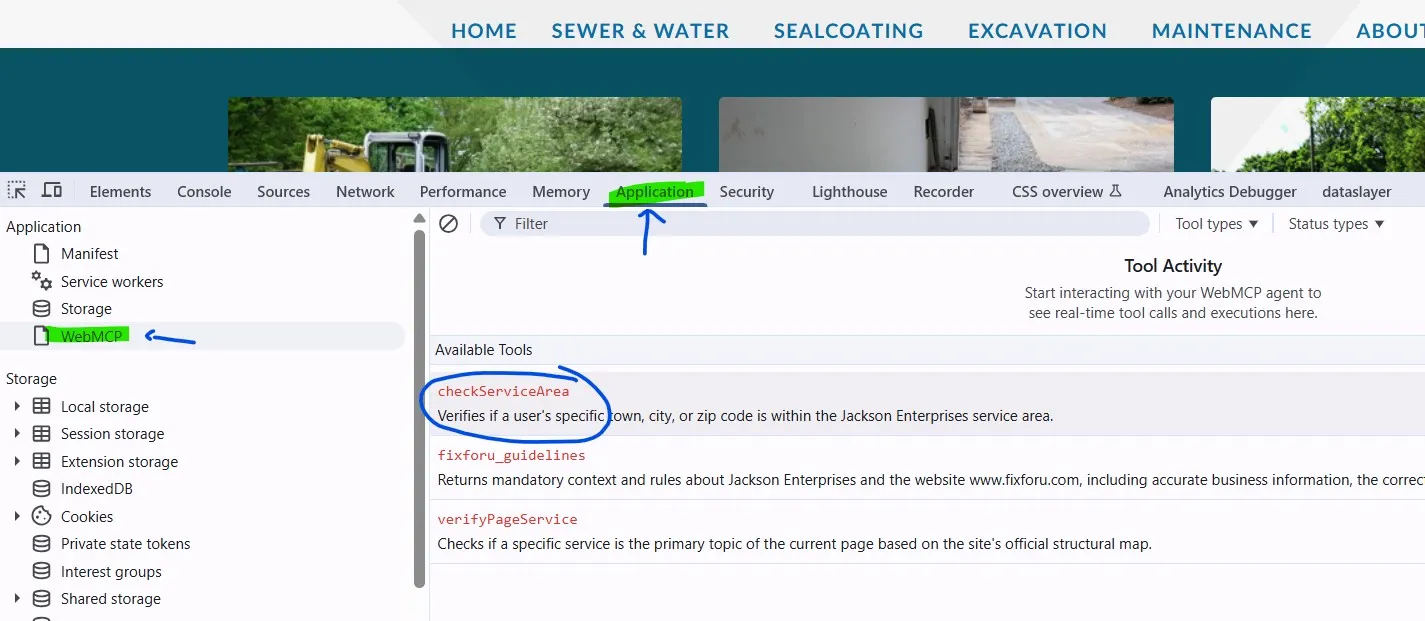
Go to fixforu.com — a contractor site I manage — and open the WebMCP Inspector Chrome extension. If you have not set that up yet, start with WebMCP Tools extensions
You will need Chrome 146 or higher with WebMCP enabled. Once you are there:
- Open the Inspector
- Go to Application
- Click WebMCP
- Click the actual WebMCP Tool that is live on the page.
There are some live WebMCP Tools active and running on fixforu.com:
- checkServiceArea
- fixforu_guidelines
- verifyPageService
Look at the right column. You will see multiple WebMCP Tools registered on that page.
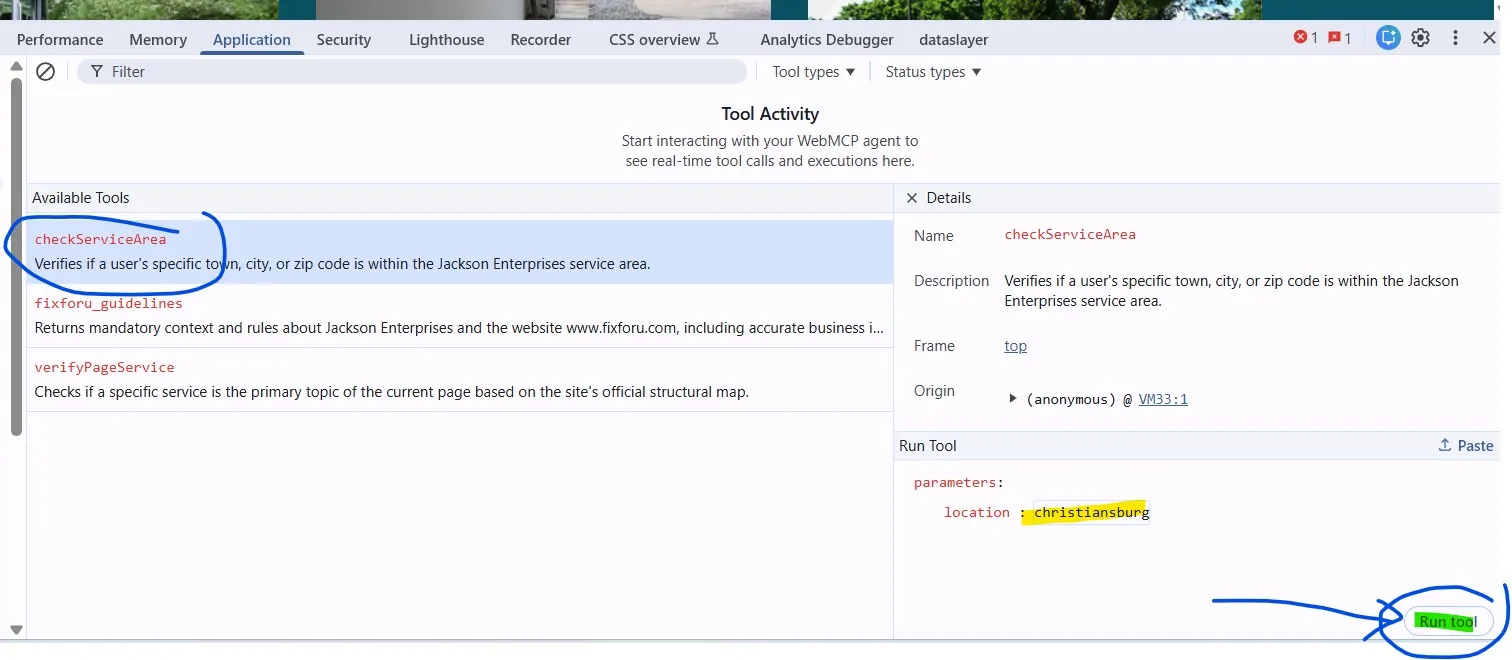
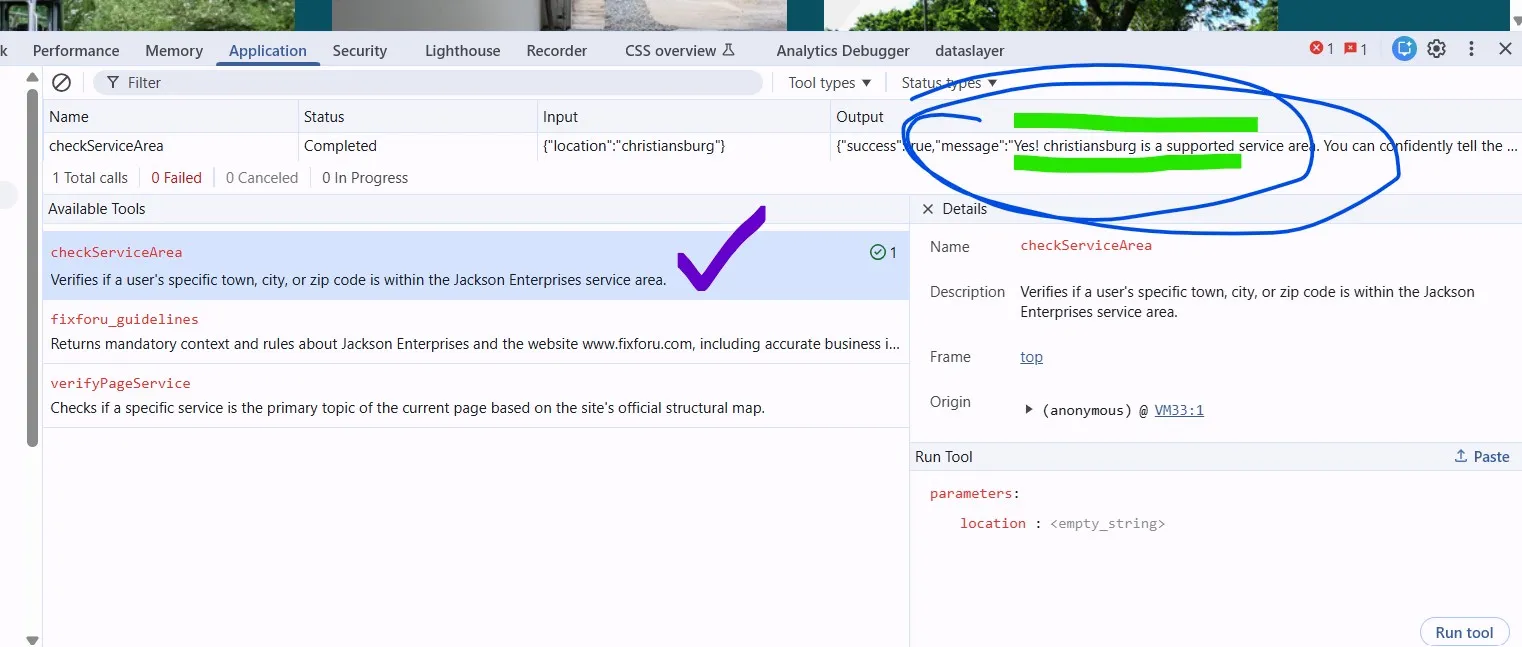
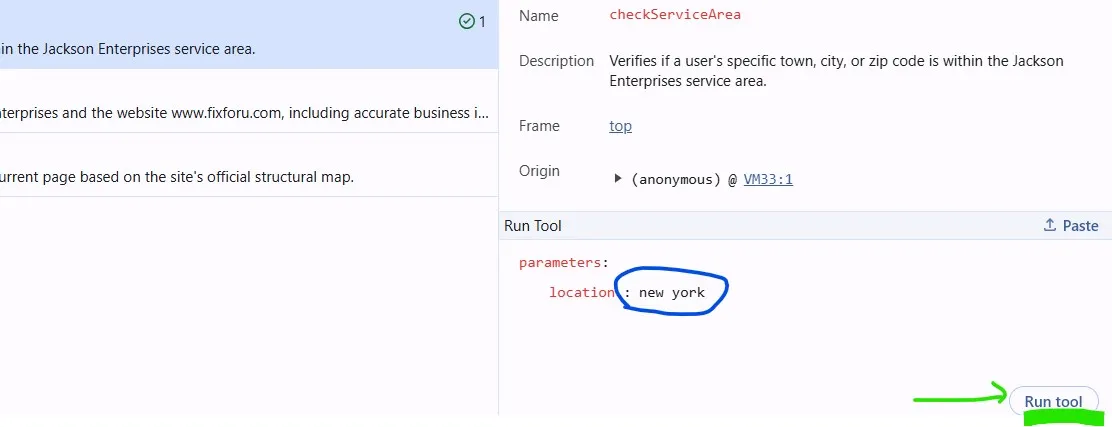
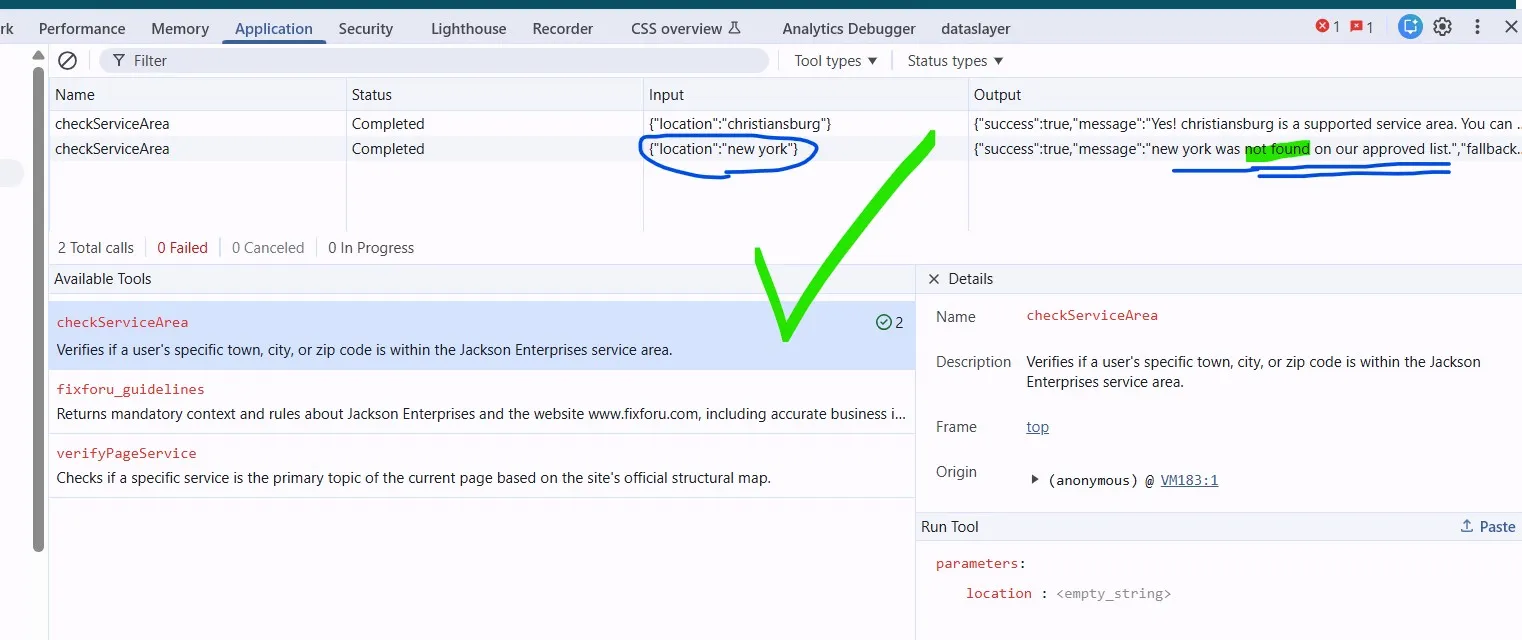
Here are some screenshots that show that ‘Christiansburg’ is a valid service area, but ‘New York’ is not. Can simply ‘RUN’ each of the city names in that checkServiceArea WebMCP Tool:
Screenshots:
-
Opening the WebMCP Tool in Inspect:
-
Add Christiansburg as a service area:
-
Confirm Christiansburg is a service area:
-
Check to see if New York is a service area:
-
Verify that New York is not a service area:
The Static Tools
Start with the static tools — these return fixed information about the business.
getContactDetails — Click it, scroll down, hit the blue Execute Tool button. You get back success: true along with company name, phone, address, and contact details. Exactly what an agent needs to answer a basic business question.
getQuoteRequirements — Execute this one and the agent returns the information it needs to help a visitor request a quote: size of the area, type of material, specific problem, desired project timeline. Structured. Actionable. Ready for an agent to use in a conversation.
This is the same job META tags and Schema markup have always done — giving machines the right words to understand what a business offers.
The Dynamic Tools
Now the interesting ones. These tools do not just return fixed data — they respond to inputs.
checkServiceArea — You will see an input field asking for a "location" value. The default says "sample". Replace it with "New York" and execute.
The response: “New York was not found on our approved service list.”
Now replace it with "Christiansburg" and execute again.
“Yes — Christiansburg is a supported service area. You can confidently tell the user we operate there.”
That is correct. This is a contractor in Christiansburg, Virginia. Not New York. The agent knows the difference.
verifyPageService — This one is where it gets genuinely interesting.
The tool accepts a keyword input. Replace "sample" with "excavation" and execute — from the homepage.
The response: “No. The keyword ‘excavation’ is not the primary topic of this page. This page is about Jackson Enterprises, Contractor, Christiansburg Contractor.”
Wait — is this not an excavation company? It is. But this is not an excavation page. That distinction matters.
Now navigate to the excavation services page: fixforu.com/excavation-services
Run the same tool with the same keyword. Execute.
“Yes. The current page is officially categorized as being about: Excavate. Excavation. Excavator. Earthmoving.”
The agent knows it is on the right page. And a quote request form is right there — so when the agent asks “Would you like me to schedule an appointment with Jackson Enterprises for Excavation Services?” it is asking from exactly the right context.
This Is Exactly What We Have Always Done With META and Schema
The verifyPageService example is the clearest demonstration of why content structure and topical alignment still matter in the agentic web — perhaps more than ever.
Building and segmenting content by topic so that an excavation page is unambiguously about excavation is the same discipline we have applied to META tags and Schema markup for twenty years. The goal has always been to align the right content signal to the right topic, on the right page, for the right machine reader.
WebMCP adds a new machine reader to that audience. The underlying principle does not change.
Which is exactly the same thing we have always done.
Bill Shultz is an enterprise digital marketing consultant with 20+ years of experience. He operates FixClicks LLC and writes about paid search, analytics, SEO, and the emerging discipline of agent optimization at billshultz.com.